![Flieber Logo Yellow Large.png]](https://help.flieber.com/hs-fs/hubfs/Flieber%20Logo%20Yellow%20Large.png?height=40&name=Flieber%20Logo%20Yellow%20Large.png)
Flieber works with two horizons: sales forecast and inventory forecast. The Sales Forecast horizon is how far ahead Flieber predicts your demand, in units and sales, for each product and store. The Inventory Forecast horizon is how far ahead Flieber projects your stock, day by day, to calculate Days of Stock and Predicted Stock Out dates. This article explains how each one works and how you can see your Sales Forecast further than 12 months ahead.
The default horizons
By default, Flieber shows your Sales Forecast for the next 12 months, and this is the period you can adjust on the 'Forecast' page. The Inventory Forecast projects your inventory for up to 365 days. Each day, Flieber takes your units on hand, adds your inbound shipments, deducts the forecasted sales of every store using that location and the demand of any bundle that uses the product as a component, and then moves on to the next day. When a product has enough inventory to last longer than that, Flieber shows 365+ instead of a specific stock out date, so you can tell at a glance that the product is not at risk within your planning horizon.
Extending your Sales Forecast beyond 12 months
If you plan budgets, financial models, or supplier commitments further out, you can extend your Sales Forecast beyond the rolling 12 months. This is enabled per account by the Flieber team, so you simply need to reach out to us through Customer Success team and tell us how many extra months you need (up to 19 months).
Once it's enabled, Flieber will generate the forecast for the longer period and you'll see a new, longer option in the period dropdown on the 'Forecast' page, right below the default one.
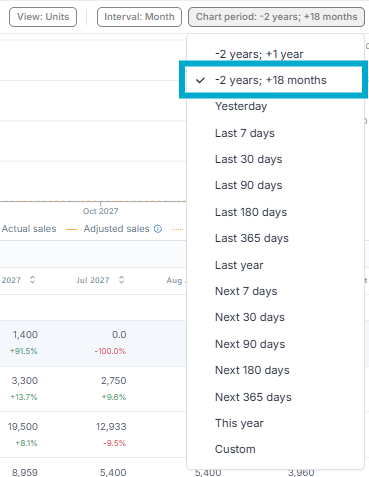
The extra months are also added to 'Manage Columns', so you can add the months after month 12 to your table and save them as a new view to reuse whenever you need them.

Note: If you use 'Custom Import Forecast' for some products, remember to upload values for the extended months as well. Flieber uses exactly what you upload, so products without data after month 12 will show lower totals for that period, especially when you look at all products together.
Does the extended horizon change my Inventory Forecast?
No. The extension applies to the Sales Forecast. The Inventory Forecast, including Days of Stock, Predicted Stock Out, and your Replenishment Needs, continues to run up to 365 days ahead.
If you want an estimate for a product showing 365+, you can take its ending inventory on day 365 and divide it by its forecasted daily sales for the following period:
Additional days of stock after day 365 = Ending inventory on day 365 / Average forecasted daily units after day 365
With your Sales Forecast extended, the forecasted units for those months are already in Flieber, so this becomes a quick calculation.
PRO Tip: Save a view with the extended month columns and export it with 'Export Table Data' to feed your finance spreadsheet. This keeps your long-term plan and Flieber aligned without typing the forecast twice.
If you have any questions or concerns, feel free to reach out to us by clicking on the chat in the lower right corner of Flieber.