![Flieber Logo Yellow Large.png]](https://help.flieber.com/hs-fs/hubfs/Flieber%20Logo%20Yellow%20Large.png?height=40&name=Flieber%20Logo%20Yellow%20Large.png)
Deciding how much to order is only half the question. The other half is whether the quantity you landed on actually fills the space you're paying for. In brief, container utilization is how much of a container or pallet your plan occupies, expressed as a percentage of its usable capacity. Flieber now calculates that for you inside the replenishment plan itself, so you can see the physical shape of your order while you're still adjusting it.
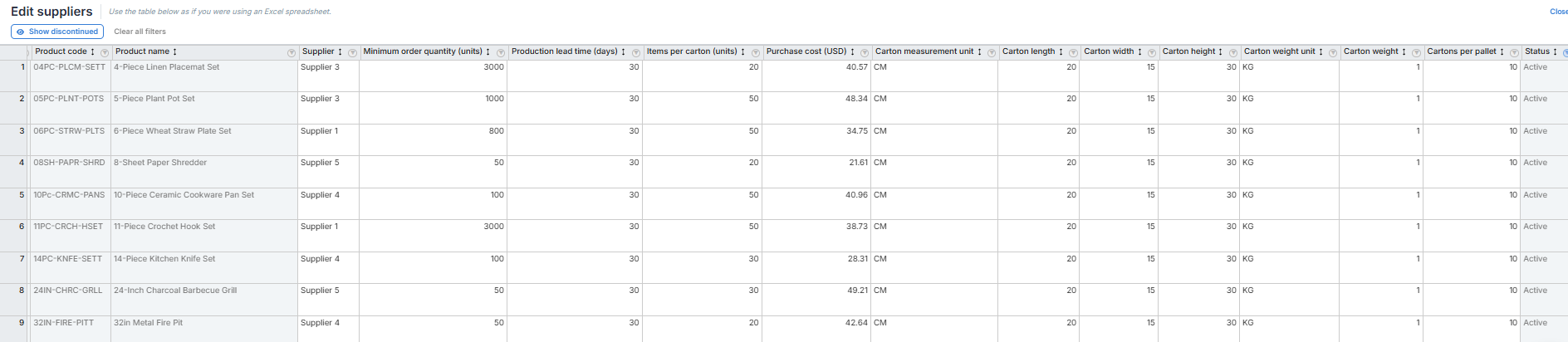
Before you start: container utilization is calculated from your carton data, so Flieber needs the packaging details for each product in the plan. You set them at 'Settings' --> 'Manage Suppliers and Lead Times' --> 'Edit Suppliers', filling in 'Length', 'Width', 'Height', 'Weight' and 'Items per Carton'. Products without this data are flagged rather than silently excluded, so you'll always know what is and isn't counted.
To see the numbers, open a replenishment plan at Replenishment Simulations' page and go to the left side on the top at 'Container sizes' step, then you can visualize all details about container utilization. Flieber converts every order quantity in the plan into cartons, packs them against the capacity of the container you picked, and returns the container summary: how many containers or pallets the plan fills, roughly how full each one is, and the total volume and total weight behind the calculation.
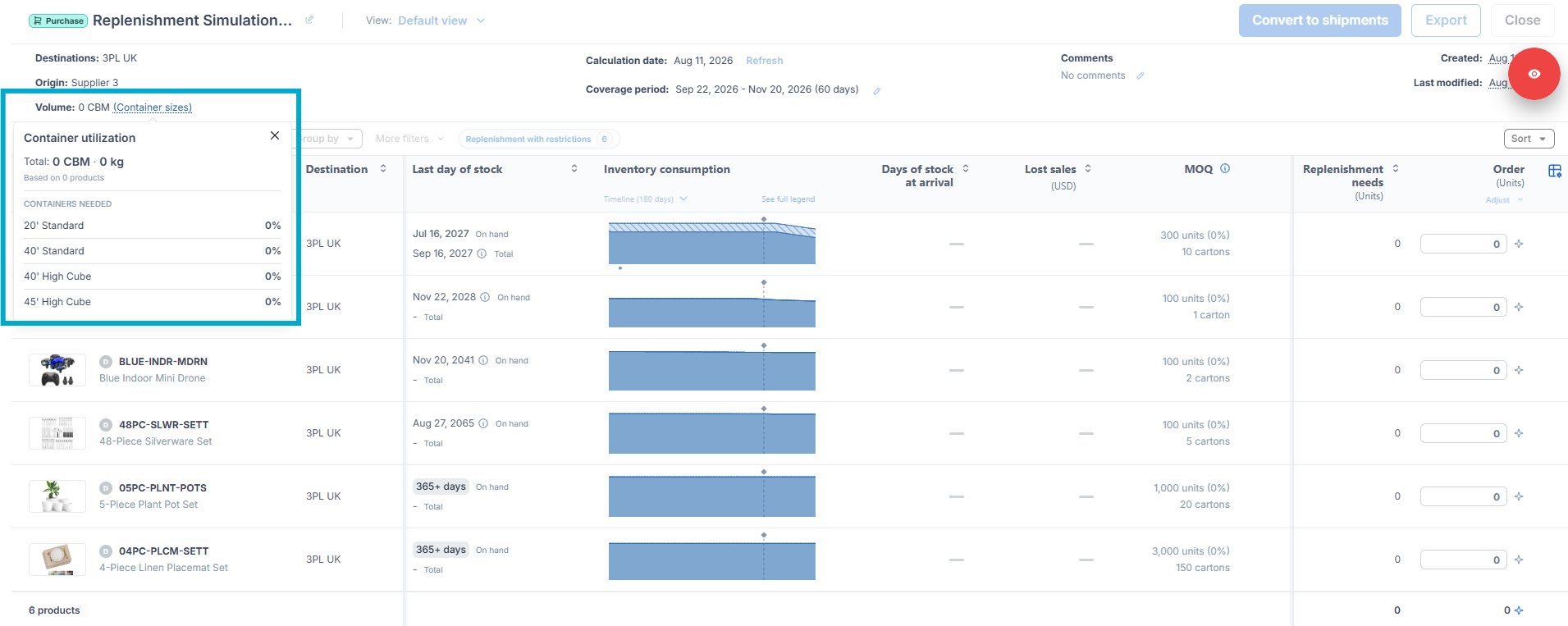
You can set yout targets filling each container. Packing to the last centimeter isn't realistic once cartons are stacked and secured in practice, so a plan sitting in that range is a full container, not a near miss. A plan that comes back at 40 percent, on the other hand, is telling you something useful. You're paying for space you aren't using, and it's usually cheaper to pull a future order forward than to ship the container half empty.
If a product in your plan is missing its carton dimensions, Flieber flags it in the summary so you can fix it before it affects the calculation. Click the flag to jump straight to 'Edit Suppliers' for that product, complete the missing fields, and the container math updates with that product included.
From there you can shape the plan against what you're seeing. Adjust order quantities directly in the plan and watch the utilization move, use 'Adjust' to round quantities up to full cartons, or hand the whole thing to Flieber's AI with 'Enhance Plan', which rebalances every quantity in the plan against your container, your cash flow limit and your own instructions in one pass. You can find more details how to enhance your plan with AI in this help article: https://help.flieber.com/how-to-replenish-units-with-ai.
PRO Tip: Fill in carton dimensions for your whole catalog in 'Edit Suppliers' ahead of time rather than product by product. You can paste the values straight in from a spreadsheet in bulk, as long as the product order matches, and every future plan will then come back with complete container math the first time you run it.
Once your quantities are set, the container utilization you see here carries the same volume and weight assumptions through to the inbound shipment you create from the plan, so what you approved is what you're tracking.
If you have any questions or concerns, feel free to reach out to us by clicking on the chat in the lower right corner of Flieber.