![Flieber Logo Yellow Large.png]](https://help.flieber.com/hs-fs/hubfs/Flieber%20Logo%20Yellow%20Large.png?height=40&name=Flieber%20Logo%20Yellow%20Large.png)
Amazon and your other connected channels sync inbound shipments into Flieber automatically, so a shipment that looks like it "disappeared" is usually not gone at all. Most of the time it has been closed, and your 'Inbound shipments' page opens, by default, on a view that only shows active shipments. Here is how to track it down in a minute.
Find the missing shipment first
The 'Inbound shipments' page opens on the 'Open' view by default, which hides shipments that are Closed. So the quickest fix is to widen what you are looking at. Open the 'View' selector on the right side of the filter row, where it is set to 'Open', and switch it to 'All', or type the shipment code straight into the 'Search by product code, SKU or shipment code' box, for example your FBA reference. In most cases the shipment will reappear with a 'Closed' status.
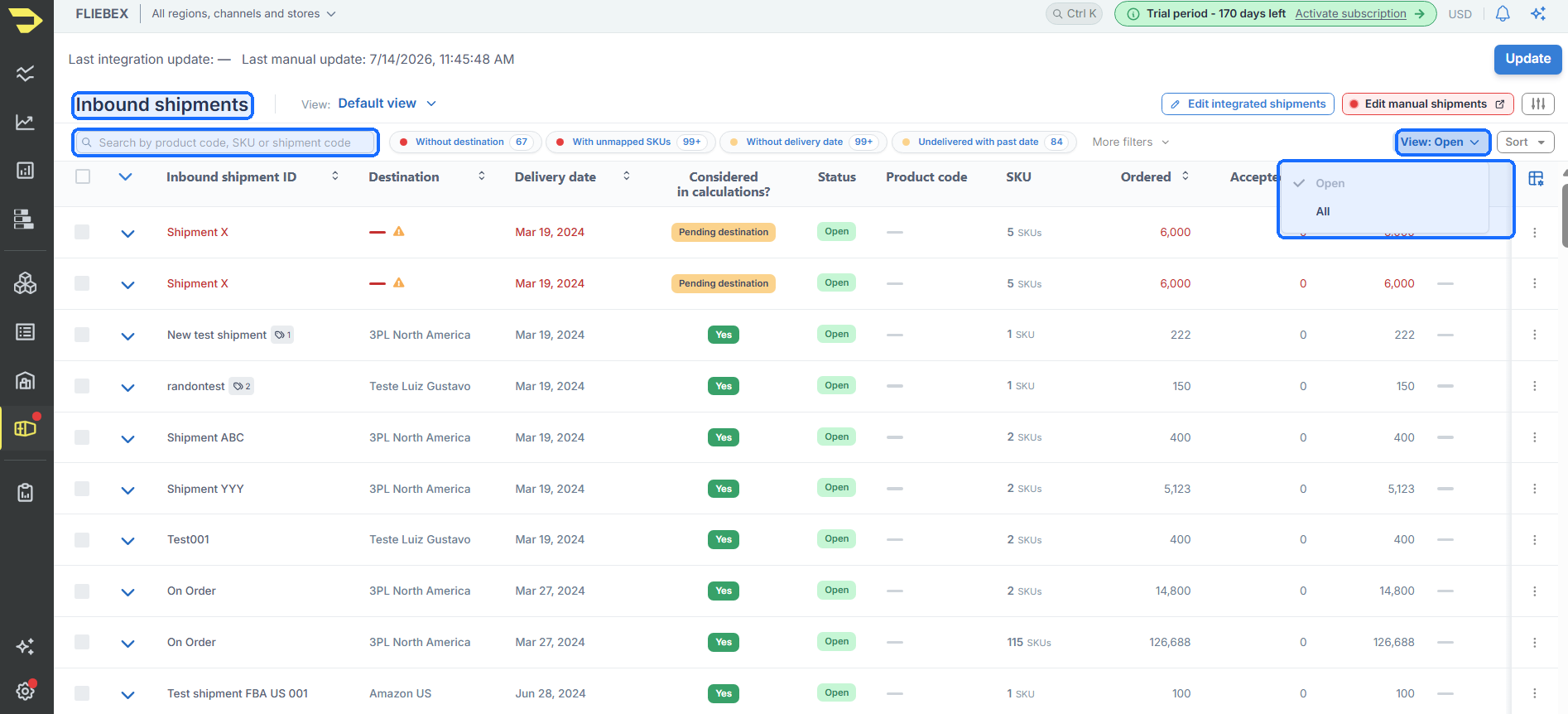
Switch the 'View' from 'Open' to 'All', or search by shipment code, to reveal shipments that are hidden from the default view.
If the shipment was closed by mistake, you can re-open it. It will move back to your active shipments and start counting toward your inventory again.
Understanding all status
Once you find the shipment, its status tells you why it was not in the default view. Flieber actually shows two things side by side: its own status (Open, Draft or Closed) and the status that comes straight from your sales channel, like Amazon's own shipment status. Flieber reads the channel status and maps it to one of its own:
- Open - active shipments that are on their way or being received, such as shipped, in transit, delivered, checked in, or receiving. These count toward your inventory forecast.
- Draft - a shipment you are still preparing in your channel. In Amazon this is the "Working" status. It appears in the default view but is not counted in your calculations yet, because you may still be editing it in Amazon Seller Central.
- Closed - shipments that were cancelled, deleted, or closed manually. These are hidden from the default view and are not counted.
NOTE: Seeing a shipment as Draft is expected if you started it in Amazon but have not finalized it. Once you confirm it in Amazon, it moves to an active status and starts counting on its own.
If it is still nowhere to be found
If the shipment does not appear under any view, not even Closed, it may simply not have synced yet. Channels sync automatically but not instantly, so give it a little time and refresh the page. If it still does not show up, confirm the shipment actually exists in your sales channel, for example in Amazon Seller Central, and then reach out to us so we can check the connection.
PRO Tip: The 'Considered in calculations?' column shows at a glance whether a shipment is feeding your inventory numbers. If a shipment is there but your forecast looks off, check that column first.
If you have any questions or concerns, feel free to reach out to us by clicking on the chat in the lower right corner of Flieber.